
Introduction
A large language model, by itself, is just a function: it takes in text and predicts what comes next. It cannot browse the web, run code, remember what happened five minutes ago, or take a sequence of actions toward a goal. Everything that turns a raw model into something that acts — that plans, calls tools, checks its own work, and persists across a long task — comes from the software wrapped around it. That surrounding system is called the agent harness, and building it well has become its own engineering discipline: harness engineering.
The term borrows its name from the physical harness engineering discussed in traditional industries — a harness bundles many individual components into a coordinated, reliable system. In AI, the harness bundles the model's calls, tool integrations, memory, and control logic into something that behaves like a coherent agent rather than a single-shot text generator.
This discipline has become increasingly central as AI companies and developers move from "chatbots that answer questions" to "agents that complete multi-step tasks" — writing and running code, researching across many sources, operating computers, or managing long-running workflows.
What Is an Agent Harness?
An agent harness is the code, configuration, and infrastructure that:
- Sends the model a prompt (including system instructions, tool definitions, and context)
- Receives the model's output, including any requested tool calls
- Executes those tool calls in the real world (search, code execution, file access, API calls)
- Feeds the results back to the model
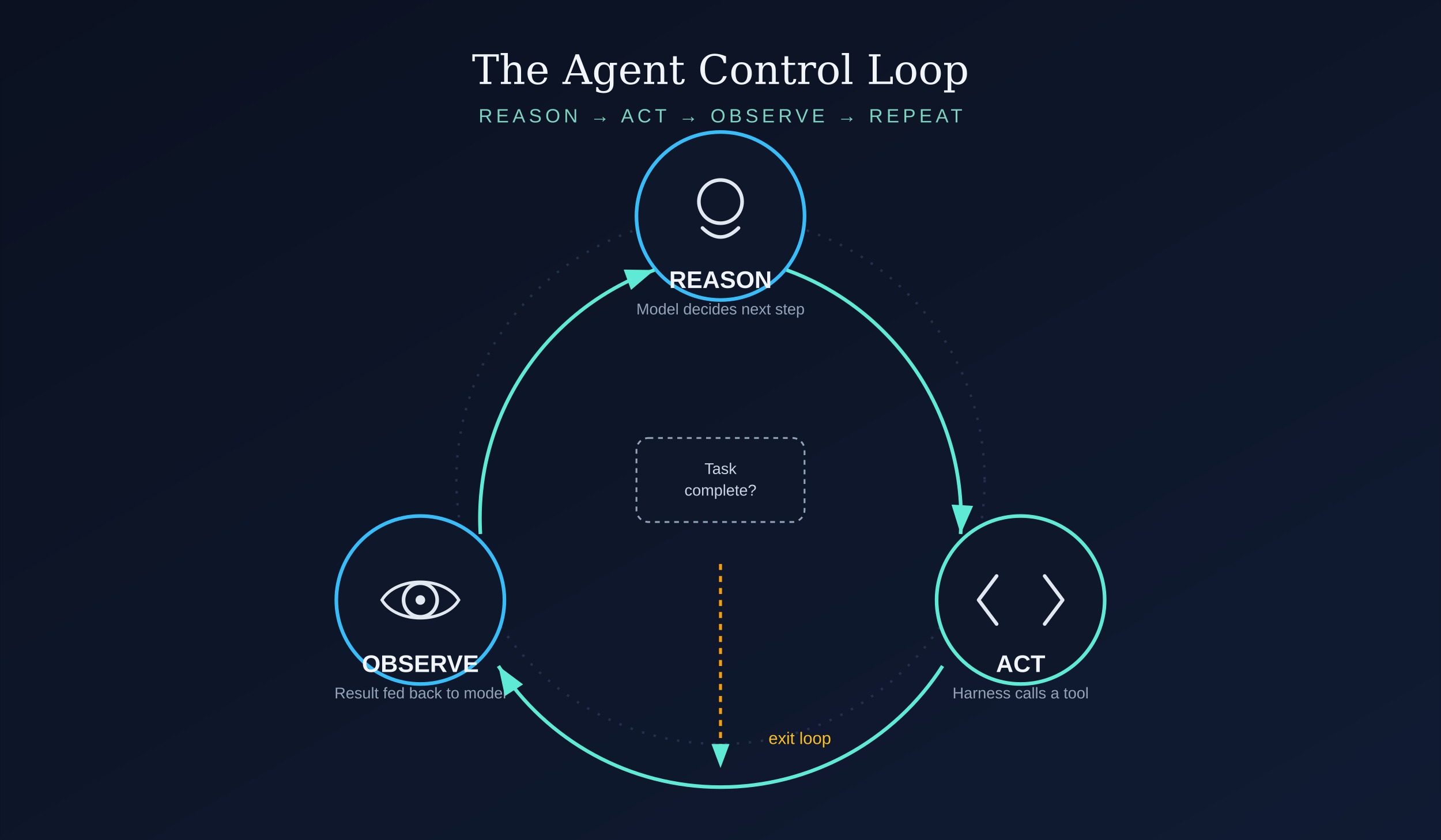
- Repeats this loop until the task is complete, a limit is reached, or human input is needed
In other words, the harness is everything outside the model weights themselves. Two developers using the exact same underlying model can get dramatically different agent behavior depending on how well-engineered their harness is — how it manages context, structures tools, handles errors, and decides when to stop.
Core Components of an Agent Harness
1. The Control Loop
At the heart of every harness is a loop, often based on patterns like ReAct (Reason + Act): the model reasons about what to do, takes an action via a tool call, observes the result, and reasons again. The harness is responsible for orchestrating this loop — deciding when to continue, when to stop, and how many iterations are allowed before timing out or escalating to a human.
2. Tool and Function Definitions
Agents accomplish real-world tasks through tools — discrete capabilities like web search, code execution, file reading, or API calls that the model can invoke. Designing good tools is a major part of harness engineering:
- Tool descriptions must be precise enough that the model reliably picks the right tool at the right time
- Tool inputs and outputs need consistent, parseable formats
- Tools should fail gracefully and return informative error messages the model can act on
- Overlapping or redundant tools tend to confuse the model and degrade performance
3. System Prompt and Instructions
The system prompt defines the agent's role, boundaries, available tools, and behavioral guidelines. In harness engineering, this is treated less like a one-off piece of text and more like a configuration file — versioned, tested, and iterated on based on observed agent behavior.
4. Context and Memory Management
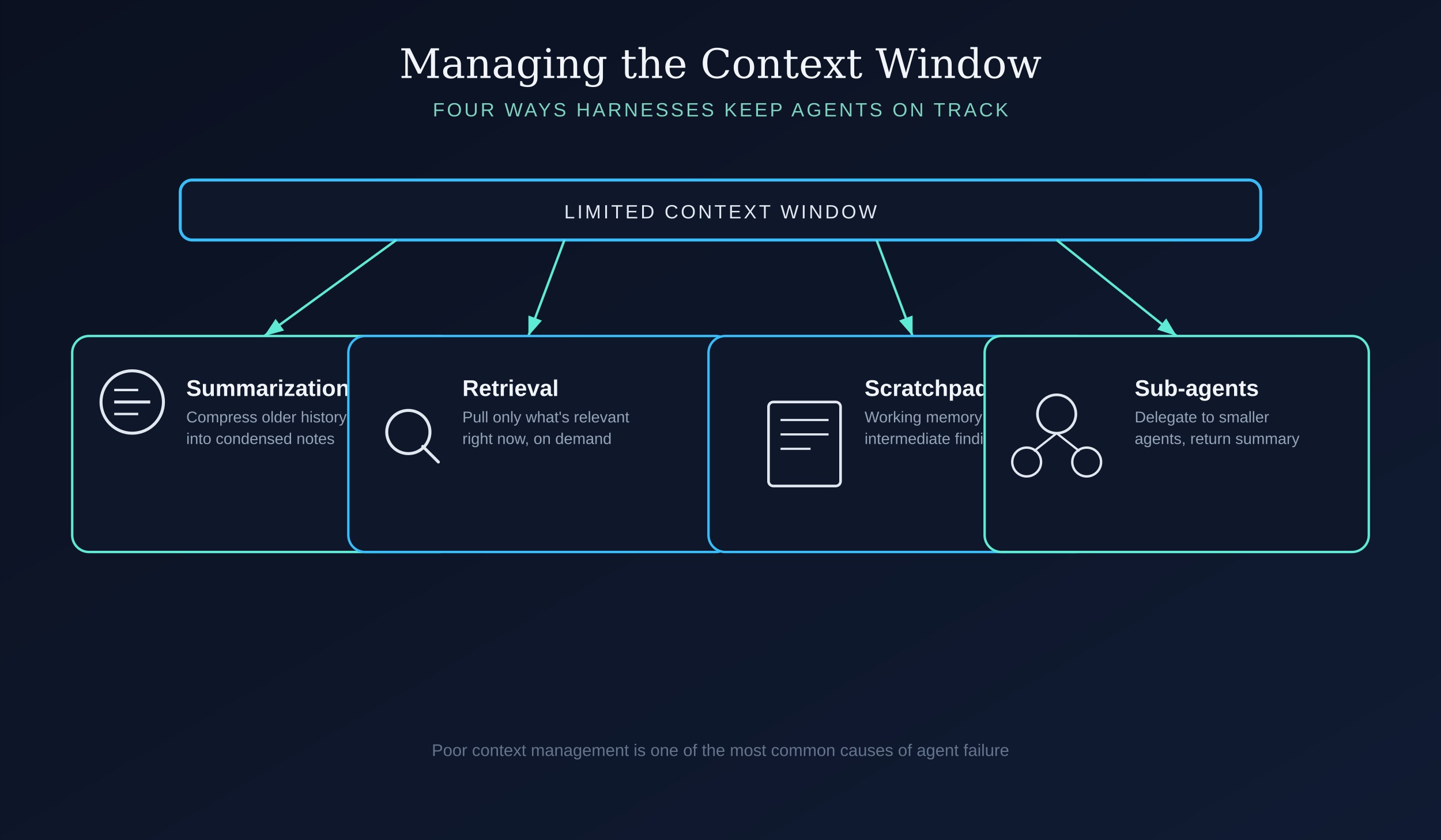
Because models have a limited context window, harnesses must manage what information stays "in view" as a task progresses. Common strategies include:
- Summarization: compressing older parts of a conversation or task history
- Retrieval: pulling in only the most relevant past information or documents on demand
- Scratchpads/working memory: giving the model a place to record intermediate findings so it doesn't need to hold everything in its "head" at once
- Sub-agent delegation: spinning up separate agent instances with their own smaller context windows to handle sub-tasks, then returning summarized results to the main agent
Poor context management is one of the most common causes of agent failure — models can lose track of the original goal, repeat work, or hallucinate details as context grows long and cluttered.
5. Execution Environment
Many agents need to act on the world — running code, editing files, browsing the web, or manipulating a computer interface. The harness must provide a safe, sandboxed environment for this: containerized filesystems, restricted network access, permission systems, and monitoring for unintended or unsafe actions.
6. Error Handling and Recovery
Real-world tool calls fail — APIs time out, files don't exist, code throws exceptions. A well-engineered harness anticipates this, feeding errors back to the model in a way it can reason about and recover from, rather than crashing the whole task or silently failing.
7. Stopping Conditions and Human Oversight
Harnesses need clear rules for when an agent should stop: task completion, a maximum number of steps, a cost or time budget, or a request for human confirmation before taking a risky or irreversible action (like sending an email or deleting a file). This is both a reliability concern and a safety one.
Why Harness Design Matters as Much as the Model
A key finding across the AI industry is that harness quality often matters as much as model quality for real-world agent performance. The same model can perform dramatically differently depending on:
- How tools are described and structured
- Whether the harness gives the model room to verify its own work (e.g., running tests after writing code)
- How well context is curated versus dumped in wholesale
- Whether the harness allows iterative refinement or forces single-shot answers
This is why organizations building coding agents, research agents, or computer-use agents invest heavily in harness design — prompt structure, tool ergonomics, and control-flow logic — independent of which underlying model they use.
Evaluation Harnesses
A related but distinct concept is the evaluation harness: infrastructure built specifically to test how well an agent performs on a set of tasks. Evaluation harnesses typically include:
- A suite of representative tasks with defined success criteria
- Sandboxed environments to run the agent safely and repeatably
- Scoring/grading logic (automated or human-in-the-loop)
- Logging and tracing tools to inspect why an agent succeeded or failed, not just whether it did
Organizations like METR, and AI labs including Anthropic and OpenAI, use evaluation harnesses to measure agent capabilities on tasks like software engineering, research, and autonomous replication risk — informing both product development and safety assessments.
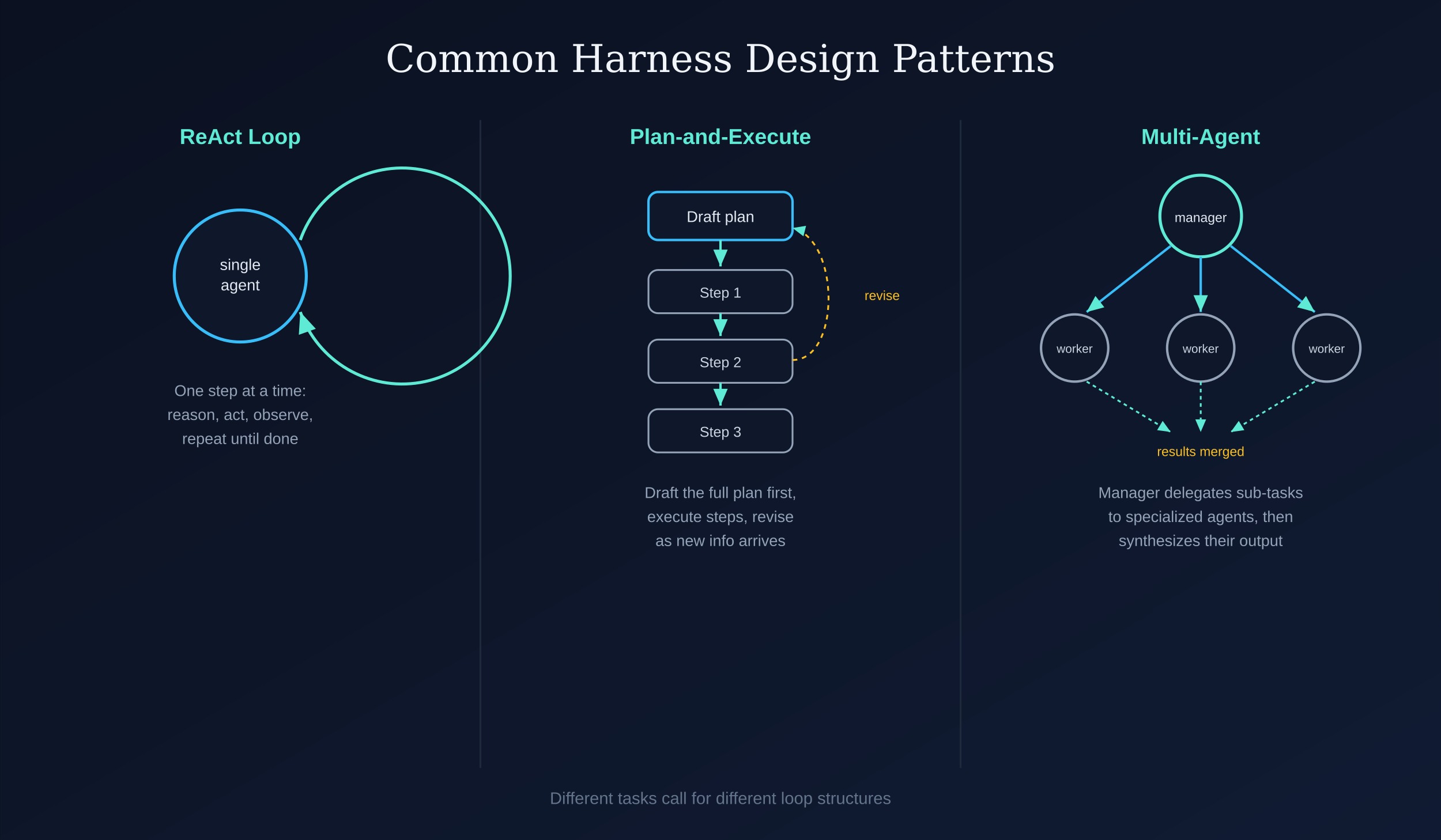
Common Harness Design Patterns
- ReAct loops: interleaved reasoning and tool calls, one step at a time
- Plan-and-execute: the agent first drafts a multi-step plan, then executes each step, revising the plan as needed
- Multi-agent orchestration: a coordinating "manager" agent delegates sub-tasks to specialized "worker" agents, then synthesizes their outputs
- Reflection/self-critique loops: the agent reviews its own output against the task requirements before finalizing, catching errors before they propagate
Key Challenges in Agent Harness Engineering
Reliability over long horizons: The longer a task runs, the more opportunities there are for small errors to compound. Harnesses need mechanisms — verification steps, checkpoints, sanity checks — to catch drift before it derails the whole task.
Tool proliferation: As more tools are added, the model has to choose correctly among more options, which can hurt accuracy. Harness engineers must balance capability breadth against decision complexity.
Cost and latency: Every loop iteration costs tokens and time. Harness design involves real tradeoffs between thoroughness (more reasoning, more tool calls, more verification) and efficiency.
Context rot: As conversations or tasks grow long, irrelevant or outdated information can crowd out what's actually needed, degrading model performance. Good harnesses actively prune and manage context rather than letting it grow unbounded.
Security and safety: Agents that can execute code, browse the web, or take real-world actions introduce risks — from prompt injection (malicious instructions hidden in retrieved content) to unintended destructive actions. Harnesses need permission boundaries, sandboxing, and human-in-the-loop checkpoints for consequential actions.
Real-World Examples
- Coding agents (like Claude Code or GitHub Copilot's agent mode) use harnesses that give the model access to a filesystem, terminal, and version control, along with tight feedback loops (run tests, see errors, fix code).
- Computer-use agents rely on harnesses that translate model outputs into mouse clicks and keyboard input, with screenshots fed back as visual context.
- Deep research agents use harnesses that orchestrate many rounds of web search and document retrieval, then synthesize findings — often using sub-agents to parallelize research across topics.
Conclusion
As AI systems move from answering isolated questions to completing open-ended, multi-step tasks, the harness surrounding the model has become as important as the model itself. Harness engineering is where prompt design, software architecture, tool ergonomics, and safety engineering intersect — and it's rapidly becoming a distinct specialization within AI engineering, much as wiring harness engineering became its own discipline once electrical systems grew too complex to wire by intuition alone. Getting the harness right is often the difference between an agent that's impressive in a demo and one that's reliable enough to trust with real work.
Comments